Background App Refresh vs Push Notifications: The Truth Behind the Persistent Battery Myth
Every time an iPhone battery dips below twenty percent before dinner, a familiar ritual plays out. Users head into their device settings, scroll past the diagnostic charts, and flip a single toggle: Background App Refresh. For over a decade, peer advice and online forums have treated this feature as the undisputed villain of mobile battery longevity. A 2026 investigative analysis from the qz.com Report highlighted how background network chatter drains handheld hardware without the user ever launching an interface.
Yet disabling this feature routinely triggers panic. Smartphone owners worry that silencing this background engine will block incoming WhatsApp messages, mute breaking news alerts, or prevent their morning alarms from sounding. That fear stems from a fundamental misunderstanding of mobile operating systems. Background activity and push delivery run on two distinct software tracks. Understanding how they interact reveals what you actually gain, and what you sacrifice, by switching off the toggle.
📌 Quick Summary:
- Core Technical Truth: Background App Refresh fetches content before you launch an application, but it has zero direct authority over incoming push notifications.
- The Battery Tradeoff: Disabling the feature saves measurable battery life and limits mobile data usage, yet social feeds and news apps will take a beat longer to populate upon opening.
- Platform Separation: Apple Push Notification service and Android FCM operate independently from app refresh protocols, keeping text messages and critical updates intact.
How iOS and Android Suspend Apps in Memory
Modern mobile operating systems manage computing resources with ruthless efficiency. When you swipe up from the bottom of your screen to exit an application, that app does not continue running unrestricted in the background. On iOS, the system transitions the software from an active state into a suspended state within seconds. In this dormant posture, the software remains parked inside physical RAM, consuming almost zero central processor cycles. The visual app switcher interface looks like a deck of open cards, but it behaves more like an album of static screenshots.
Apple engineers designed this model to preserve battery runtime while facilitating rapid app state restoration. Relaunching an app from RAM requires a fraction of the thermal and electrical power consumed by a cold boot from NAND flash storage.
Android handles background execution through comparable mechanics, categorizing operations into foreground services, background tasks, and cached processes. Google has steadily tightened these restrictions, using standby buckets and automated battery optimization settings to cut processor access for dormant tools.
Background App Refresh creates a tightly regulated loophole in this suspension regime. It gives dormant apps permission to wake up periodically, connect to Wi-Fi and cellular data, pull fresh server data, and slip right back to sleep. A podcast app can download the newest episode of an subscribed show while your phone sits face down on a nightstand. When you finally tap the icon, the media is already queued up, eliminating loading spinners entirely.
Why Disabling Background App Refresh Won't Silence Your Messages
The persistent fear that disabling Background App Refresh breaks incoming communication rests on a myth. Notifications do not rely on your apps running in the background to alert you.
When someone sends you a message on Signal, Telegram, or Slack, the server does not talk directly to the dormant app on your phone. Instead, the message payload routes through the Apple Push Notification service (APNs) or Google Cloud Messaging/Firebase Cloud Messaging (FCM). Your phone maintains a single, persistent, low-power socket connection to Apple or Google servers at all times.
When an incoming message arrives, the operating system picks up the push payload, generates the alert banner, sounds the chime, and places the message on your lock screen. The app itself never woke up, processed code, or polled its own private server. Disabling Background App Refresh leaves APNs and FCM completely untouched. Text messages, bank fraud alerts, and breaking news banners appear precisely as scheduled.
Silent notifications present the only technical nuance. Developers sometimes transmit invisible push notifications to trigger behind-the-scenes data updates without chiming or waking your display. If you disable background updates globally, the operating system simply drops those invisible wake-up packets. The visual banners you care about remain fully operational.
Resource Footprint: Multitasking Features Versus Direct Battery Drain
Background App Refresh incurs real hardware costs. Transmitting packets across an LTE or 5G radio consumes considerably more power than pulling data over a stable home Wi-Fi network. Cell towers force mobile baseband modems into high-power draw states every time an application demands an off-screen network poll.
| Multitasking Mechanism | Active System Resources | Notification Impact | Typical Battery Draw |
|---|---|---|---|
| Background App Refresh (iOS) | Cellular/Wi-Fi modem, short burst CPU cycles | Zero effect on standard visual/audio alerts | 3%, 12% per day depending on app list |
| Apple Push Notification Service (APNs) | Single low-power shared system daemon | Direct delivery of all banners, badges, and sounds | Negligible (under 2% per day) |
| Android Background Processes | Thread pools, WorkManager, periodic job schedulers | Isolated from FCM push deliveries | 4%, 15% depending on OEM aggressive throttling |
| Low Power Mode (System-wide) | CPU clock throttled down, background refresh halted | Delivers priority push; pauses fetch updates | Saves 15%, 25% overall daily power |
When Apple introduces Low Power Mode, the operating system instantly cuts Background App Refresh across every installed software package. This single intervention explains much of the sudden battery stabilization users experience when their battery gauge hits twenty percent.
The feature also impacts cellular data usage. Social media platforms preload high-resolution video reels and multi-megabyte image assets so feeds scroll seamlessly. Left unmonitored on metered cellular data plans, this quiet prefetching can consume gigabytes of roaming allowances every billing cycle.
Algorithmic Wakeups: When Does Refresh Actually Happen?
Background updates do not run on an unyielding, synchronized clock. Your phone does not indiscriminately wake up eighty apps at 3:00 AM to fetch feeds. Instead, modern mobile operating systems rely on predictive heuristic algorithms.
iOS tracks device usage routines locally. If you consistently open a financial portfolio app at 7:15 AM every weekday, iOS grants that software an execution window around 7:08 AM. It pulls live exchange rates and portfolio valuations so the interface stands ready the second you tap the glass. If you rarely open an app, the system strips its background allotment down to near zero.
External battery health and signal conditions also govern these background calls. An iPhone sitting on two bars of cellular reception with an aging battery will throttle background execution intervals automatically.
On Android, Google balances this equation using explicit Doze states. Once an Android phone remains stationary and unplugged for an extended stretch, the operating system forces background tasks into maintenance windows. These windows grow progressively further apart as standby duration increases, ensuring dormant apps do not consume system resources while you sleep.
Auditing Your Settings for Maximum Performance
Treating Background App Refresh as an all-or-nothing binary toggle is an inefficient way to manage your phone. The ideal strategy requires targeted curation directly inside your operating system settings.
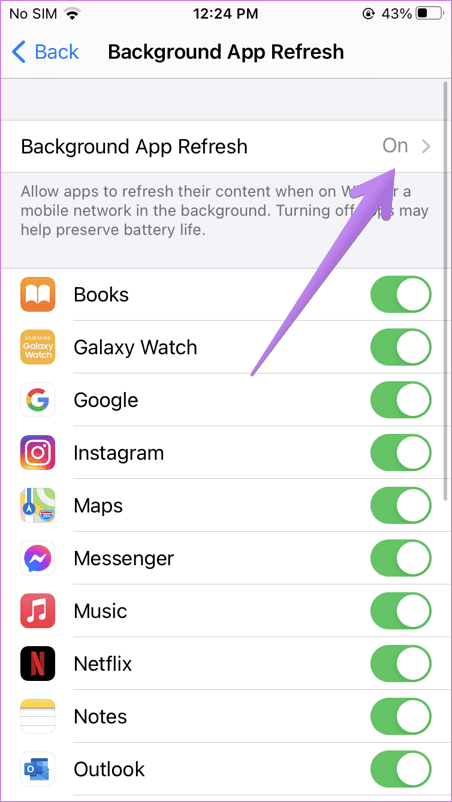
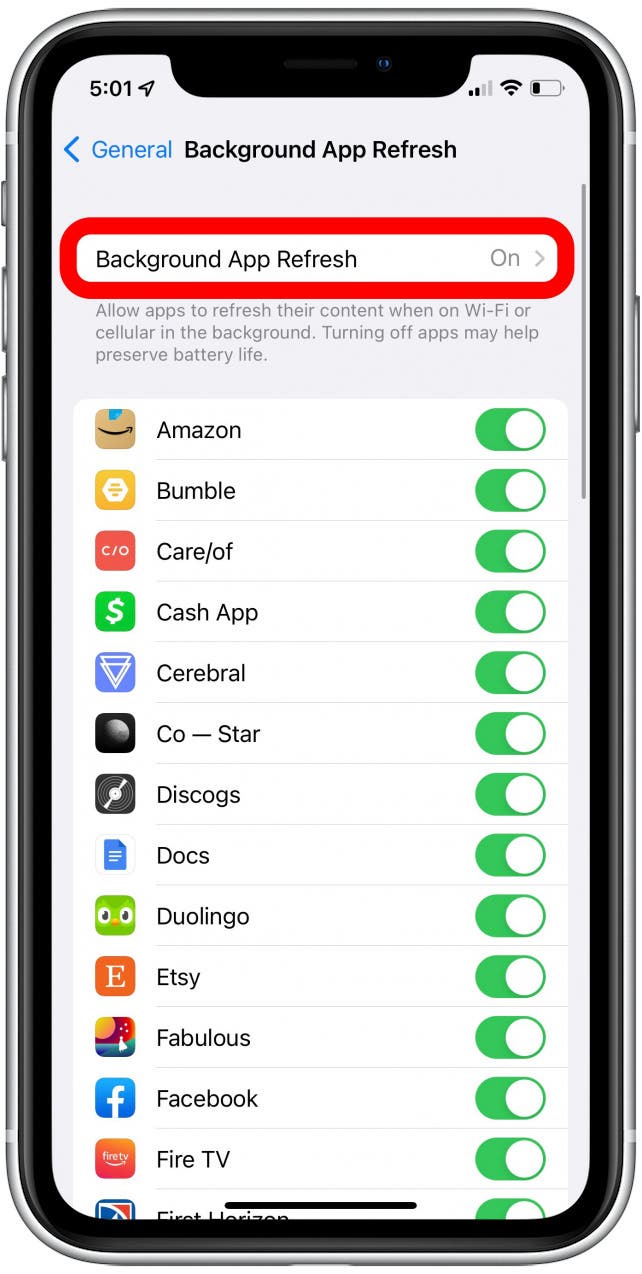
Open your iPhone settings, navigate to General, and tap Background App Refresh. You have three primary network states: Off, Wi-Fi, and Wi-Fi & Cellular Data. Setting this configuration to Wi-Fi immediately protects cellular data allowances without sacrificing desktop conveniences at home.
iPhone Settings
└── General
└── Background App Refresh
├── Configuration: [Off | Wi-Fi | Wi-Fi & Cellular Data]
└── Per-App Granular Toggles (Customize by use case)
Next, scroll down the per-app directory and apply deliberate restrictions:
- Disable for high-volume social platforms: Meta apps, TikTok, and retail storefronts consume excessive network cycles to keep algorithmic feeds current. Turn these off.
- Disable for seldom-used tools: Ride-sharing apps, airline booking engines, and casual puzzle games have no practical justification for background network access when closed.
- Keep active for utility workflows: Cloud storage clients like Dropbox or Google Drive need background permissions to complete automated camera uploads. Leaving the feature on for weather tracking apps ensures current widget conditions.
Android users achieve identical fine-tuning by entering device Settings, choosing Apps, and inspecting individual data and battery sections. Setting background data limits and flipping the battery optimization toggle to "Optimized" or "Restricted" tames greedy third-party services.
Frequently Asked Questions (FAQ)
Q1: Will turning off Background App Refresh delay my incoming WhatsApp or iMessage texts?
A1: No. Direct messaging alerts rely on dedicated push notification infrastructure (Apple APNs or Google FCM), which stays active regardless of this setting. Your notifications will chime immediately; the app simply fetches the full conversational log the moment you tap into it.
Q2: Why do some guides claim that force-closing apps saves battery life?
A2: That common belief is incorrect. Force-quitting an app purges it entirely from RAM. Relaunching that software forces the processor and storage drives to execute a full cold boot, which uses more battery than letting the operating system hold the app in a suspended, low-draw state.
Q3: How much battery life will I actually save by disabling the feature entirely?
A3: For users with dozens of active, media-heavy apps, turning the toggle completely off saves between 8% and 15% of total battery life over a typical 16-hour operating window, primarily by curbing modem activations.
Q4: Does disabling Background App Refresh stop location tracking?
A4: Not entirely. While it limits background data fetches, location access is governed by independent permissions. Check Settings > Privacy & Security > Location Services to control which apps track your coordinates off-screen.
Calibrating System Multitasking for Everyday Use
Managing Background App Refresh is not about starving modern smartphones of their smart capabilities. It is about understanding the boundary between notifications and background network activity.
Leave the feature enabled for applications that offer clear utility when updated ahead of time: navigational tools, automated cloud backups, and smart home managers. Disable it across media-heavy social platforms and shopping apps that use background execution to stage advertisements and cache video streams.
Taking five minutes to adjust these toggles preserves battery longevity throughout the day, curbs cellular data overages, and keeps every critical incoming alert firing exactly when it should.


