Greek Letters Copy and Paste Master Guide: Full Alphabet, Alt Codes, and Shortcuts
Whether you are balancing a regression model in Python, documenting derivative exposure on a trading desk, or finalizing a technical manuscript, missing Greek characters interrupt digital workflows. Standard QWERTY layouts isolate these characters behind cumbersome character map applications or complex markup systems. As detailed in the Frontiers Report on research methodology and notation, precise typography prevents ambiguity across scientific research measurement symbols and statistical notation symbols.
This directory functions as an instant, clean-copy workstation. Below, you will find every uppercase and lowercase Greek alphabet character, alongside verified Alt codes, Unicode hexadecimal points, HTML Greek entity codes, and LaTeX Greek math syntax for rapid technical publishing.
📌 Key Takeaways:
- Universal Directory: Immediate access to clean Unicode glyphs from Alpha to Omega, pre-formatted to eliminate font-rendering corruption across web and mobile platforms.
- Cross-Platform Inputs: Windows Alt codes operate exclusively via the dedicated numeric keypad, whereas macOS uses native Unicode Hex Input mode or system-level text replacements.
- Domain Precision: Specialized application across financial options risk management and advanced statistical notation requires distinguishing between typographic variants like standard theta and script theta.
Complete Greek Alphabet Copy and Paste Directory
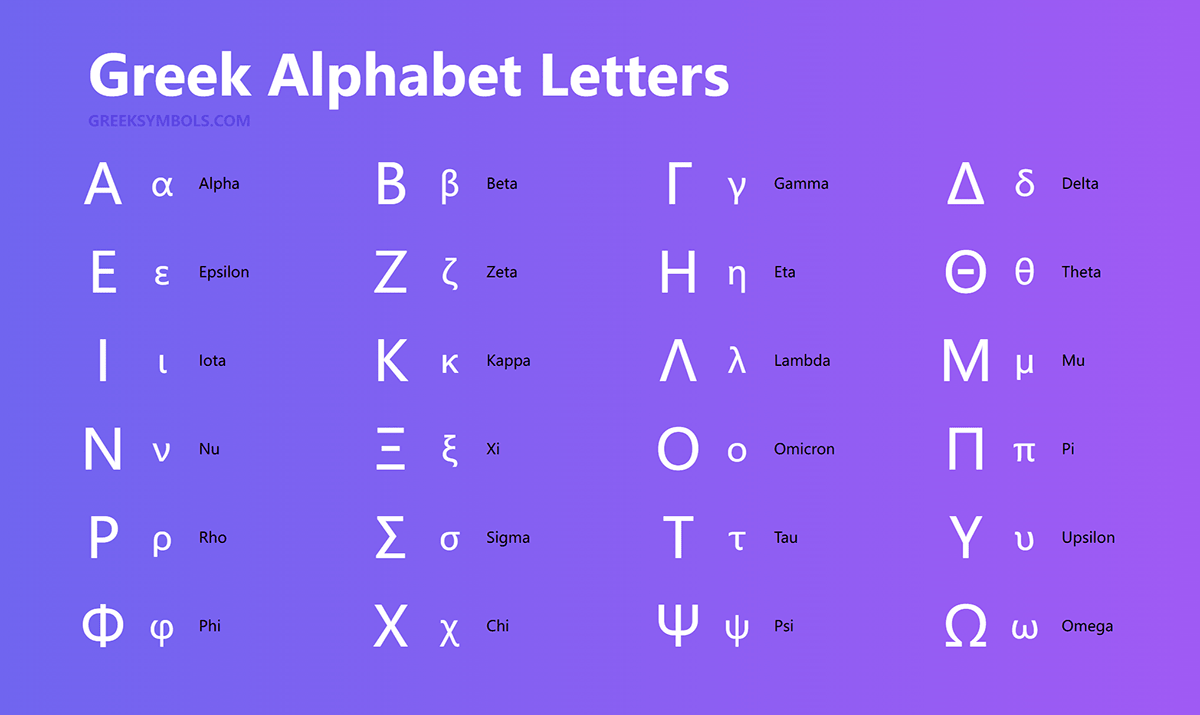
Select, highlight, and copy the character you need directly from the grid below. These characters are raw UTF-8 glyphs that paste seamlessly into Excel, Slack, Notion, Word, and Google Docs without dragging unwanted styling or formatting tags along with them.
Uppercase Letters:
Α Β Γ Δ Ε Ζ Η Θ Ι Κ Λ Μ Ν Ξ Ο Π Ρ Σ Τ Υ Φ Χ Ψ Ω
Lowercase Letters:
α β γ δ ε ζ η θ ι κ λ μ ν ξ ο π ρ σ ς τ υ φ χ ψ ω
Mathematical & Typographic Variants:
ϑ (script theta) · 𝜗 (mathematical theta) · 𝜑 (script phi) · ϖ (pi variant) · ϰ (kappa variant) · ϱ (rho variant) · ∇ (nabla / gradient operator)
Full Greek Alphabet Specification: Alt Codes, Unicode, and LaTeX
Different development environments require different input standards. A web developer needs clean entity strings, while an academic drafting in Overleaf relies entirely on math-mode escape sequences. The table below outlines the full 24-character system with corresponding codes across all major environments.
| Character Name | Upper / Lower | Windows Alt Code | Unicode Hex | LaTeX Syntax | HTML Entity |
|---|---|---|---|---|---|
| Alpha | Α / α | Alt + 913 / Alt + 224 | U+0391 / U+03B1 | A / \alpha | Α / α |
| Beta | Β / β | Alt + 914 / Alt + 225 | U+0392 / U+03B2 | B / \beta | Β / β |
| Gamma | Γ / γ | Alt + 226 / Alt + 947 | U+0393 / U+03B3 | \Gamma / \gamma | Γ / γ |
| Delta | Δ / δ | Alt + 916 / Alt + 235 | U+0394 / U+03B4 | \Delta / \delta | Δ / δ |
| Epsilon | Ε / ε | Alt + 917 / Alt + 238 | U+0395 / U+03B5 | E / \varepsilon | Ε / ε |
| Zeta | Ζ / ζ | Alt + 918 / Alt + 950 | U+0396 / U+03B6 | Z / \zeta | Ζ / ζ |
| Eta | Η / η | Alt + 919 / Alt + 951 | U+0397 / U+03B7 | H / \eta | Η / η |
| Theta | Θ / θ | Alt + 233 / Alt + 952 | U+0398 / U+03B8 | \Theta / \theta | Θ / θ |
| Iota | Ι / ι | Alt + 921 / Alt + 953 | U+0399 / U+03B9 | I / \iota | Ι / ι |
| Kappa | Κ / κ | Alt + 922 / Alt + 954 | U+039A / U+03BA | K / \kappa | Κ / κ |
| Lambda | Λ / λ | Alt + 923 / Alt + 955 | U+039B / U+03BB | \Lambda / \lambda | Λ / λ |
| Mu | Μ / μ | Alt + 924 / Alt + 230 | U+039C / U+03BC | M / \mu | Μ / μ |
| Nu | Ν / ν | Alt + 925 / Alt + 957 | U+039D / U+03BD | N / \nu | Ν / ν |
| Xi | Ξ / ξ | Alt + 926 / Alt + 958 | U+039E / U+03BE | \Xi / \xi | Ξ / ξ |
| Omicron | Ο / ο | Alt + 927 / Alt + 959 | U+039F / U+03BF | O / o | Ο / ο |
| Pi | Π / π | Alt + 928 / Alt + 227 | U+03A0 / U+03C0 | \Pi / \pi | Π / π |
| Rho | Ρ / ρ | Alt + 929 / Alt + 961 | U+03A1 / U+03C1 | P / \rho | Ρ / ρ |
| Sigma | Σ / σ (ς) | Alt + 228 / Alt + 229 | U+03A3 / U+03C3 | \Sigma / \sigma | Σ / σ |
| Tau | Τ / τ | Alt + 932 / Alt + 231 | U+03A4 / U+03C4 | T / \tau | Τ / τ |
| Upsilon | Υ / υ | Alt + 933 / Alt + 965 | U+03A5 / U+03C5 | \Upsilon / \upsilon | Υ / υ |
| Phi | Φ / φ | Alt + 232 / Alt + 237 | U+03A6 / U+03C6 | \Phi / \phi | Φ / φ |
| Chi | Χ / χ | Alt + 935 / Alt + 967 | U+03A7 / U+03C7 | X / \chi | Χ / χ |
| Psi | Ψ / ψ | Alt + 936 / Alt + 968 | U+03A8 / U+03C8 | \Psi / \psi | Ψ / ψ |
| Omega | Ω / ω | Alt + 234 / Alt + 969 | U+03A9 / U+03C9 | \Omega / \omega | Ω / ω |
Keyboard Shortcuts for Windows, Mac, and Mobile
Copying from a browser tab works for occasional papers, but frequent technical writing requires muscle memory. Operating systems handle non-Latin typography through distinct input layers.
On Windows systems equipped with a dedicated numpad, holding Alt while entering three or four digits routes directly through the OEM or Windows-1253 code pages. Missing a numpad complicates the process. In Microsoft Word, you can type the four-character Unicode code point (such as 03C0 for pi) and press Alt + X to convert it instantly into the corresponding glyph. Pressing Windows + . (Period) opens the native Windows Symbol Picker, where the Greek script tab displays every uppercase and lowercase character.
macOS avoids the numpad requirement. Pressing Control + Command + Space brings up the Character Viewer, which can be pinned to your toolbar. For faster entry, navigate to System Settings > Keyboard > Text Replacements. Set shortcuts such as \delta to expand automatically into δ. If you prefer low-level typing, enable the Unicode Hex Input keyboard layout in macOS settings, hold Option, and enter the four-digit Unicode sequence (e.g., Option + 03C3 yields σ).
On iOS and Android, physical shortcuts are unavailable. Long-pressing the Roman equivalent on default keyboards yields accented characters rather than Greek letters. The cleanest fix involves adding the Greek software keyboard in system language settings. Switching layouts takes a single tap on the globe icon. Alternatively, iOS users can configure Text Replacement shortcuts (Settings > General > Keyboard > Text Replacement) to expand strings like ;alpha directly into α.

Financial Greeks and Risk Management Notation
Quantitative finance relies on Greek characters to calculate derivatives pricing and manage options risk. In an institutional setting, entering the wrong symbol into an algorithm, trade log, or internal documentation creates operational risk. As tracked by educational monitors including Investopedia's derivatives analysis, the primary options Greeks reflect clear partial derivatives:
Delta (Δ / δ): Measures the expected price change of an option per $1.00 move in the underlying asset. Traders describe long call positions as having positive delta, while puts hold negative delta.
Gamma (Γ / γ): Represents the rate of change of Delta relative to movements in the underlying price. Gamma measures the curvature of an option's value profile.
Theta (Θ / θ): Quantifies absolute time decay. It tracks the daily reduction in an option contract's premium as expiration approaches, assuming all other variables remain static.
Vega: Denotes sensitivity to volatility. Vega represents the price change per single percentage point move in implied volatility. Note that Vega is not an authentic letter in the Greek alphabet. Financial typography substitutes the lowercase script variant ϰ, the standard ν (Nu), or spells out the word "Vega" explicitly to avoid system errors.
Rho (Ρ / ρ): Calculates sensitivity to baseline interest rate shifts, tracking premium fluctuation per 1% adjustment in the risk-free rate.
Typography Pitfalls: Unicode Greek vs. Mathematical Alphanumeric Symbols
A frequent error among researchers involves mixing language-level Greek characters with isolated mathematical alphanumeric symbols. The Unicode Greek character set (U+0370 through U+03FF) is designed for modern Greek orthography and plain text. However, Unicode also provisions mathematical variants under the Mathematical Alphanumeric Symbols block (U+1D400 through U+1D7FF).
If you paste a mathematical italic pi (𝝅, U+1D745) into a script or software pipeline that expects standard lowercase pi (π, U+03C0), standard search indexing fails, tokenizers break, and variable declarations produce compiler errors. Python 3 allows Unicode identifiers, but it distinguishes between script variants and raw glyphs. When publishing for cross-platform web consumption, stick to the standard Greek block (U+0370, U+03FF) unless your typesetting system specifically demands an isolated styling abstraction.
Font rendering creates another challenge. Standard sans-serif system fonts like Roboto, San Francisco, and Segoe UI render Greek characters cleanly. Some custom display typefaces lack Greek glyphs entirely, causing operating systems to substitute a fallback font. This results in misaligned, disproportionate characters known as "ransom note typography." When specifying CSS font stacks for technical documentation, prioritize web-safe fonts with verified Unicode coverage, such as Arial, Times New Roman, Computer Modern, or dedicated open-source math fonts like STIX Two Text.
Frequently Asked Questions (FAQ)
Q1: Why do some Greek letters look identical to English letters?
A1: The Latin alphabet evolved directly from the Cumaean variant of the Greek alphabet. Consequently, uppercase Alpha (Α), Beta (Β), Epsilon (Ε), Zeta (Ζ), Eta (Η), Iota (Ι), Kappa (Κ), Mu (Μ), Nu (Ν), Omicron (Ο), Rho (Ρ), Tau (Τ), and Chi (Χ) share identical visual glyphs with their Latin equivalents. However, their Unicode values differ (for instance, Latin 'A' is U+0041, whereas Greek 'Α' is U+0391). Typing the wrong variant breaks search queries and program compilers.
Q2: Why does lowercase Sigma have two different forms?
A2: Lowercase Sigma uses two distinct characters based on position. Within or at the start of a word, it appears as σ (U+03C3). At the end of a word, Greek orthography uses the final sigma ς (U+03C2). In scientific and mathematical contexts, standard lowercase σ is used almost exclusively, except in specific statistical notations where final sigma designates unique sample subsets.
Q3: How do I paste Greek letters into Excel without breaking formulas?
A3: Modern Excel workbooks fully support UTF-8 encoding. You can paste standard Greek characters directly into formula bars, worksheet titles, and cells. If a formula using a Greek character produces a #NAME? error, ensure the character is part of a string inside quotes, or check that your named range matches the exact Unicode code point of your variable.
Strategic Takeaways for Technical Workflows
Digital typography should accelerate technical writing rather than slow it down. Bookmark this directory to copy characters when moving quickly between applications. For high-volume drafting across scientific, engineering, and financial domains, configure OS-level text replacement expansions or install the native Greek keyboard layout. Doing so eliminates character hunting, preserves Unicode formatting integrity, and ensures mathematical notations remain uniform across every platform.


