How Many Centimeters in an Inch? The Complete TV Sizing and Conversion Guide

Every trip down the consumer electronics aisle begins with an awkward translation. While most of the world measures living room furniture, doorways, and wall space in metric units, televisions remain strictly defined by imperial inches. As highlighted in a recent MSN Report examining why the consumer tech sector clings to Anglo-Saxon measurements, shoppers routinely miscalculate the physical space required for modern displays because they confuse screen diagonals with actual product width.
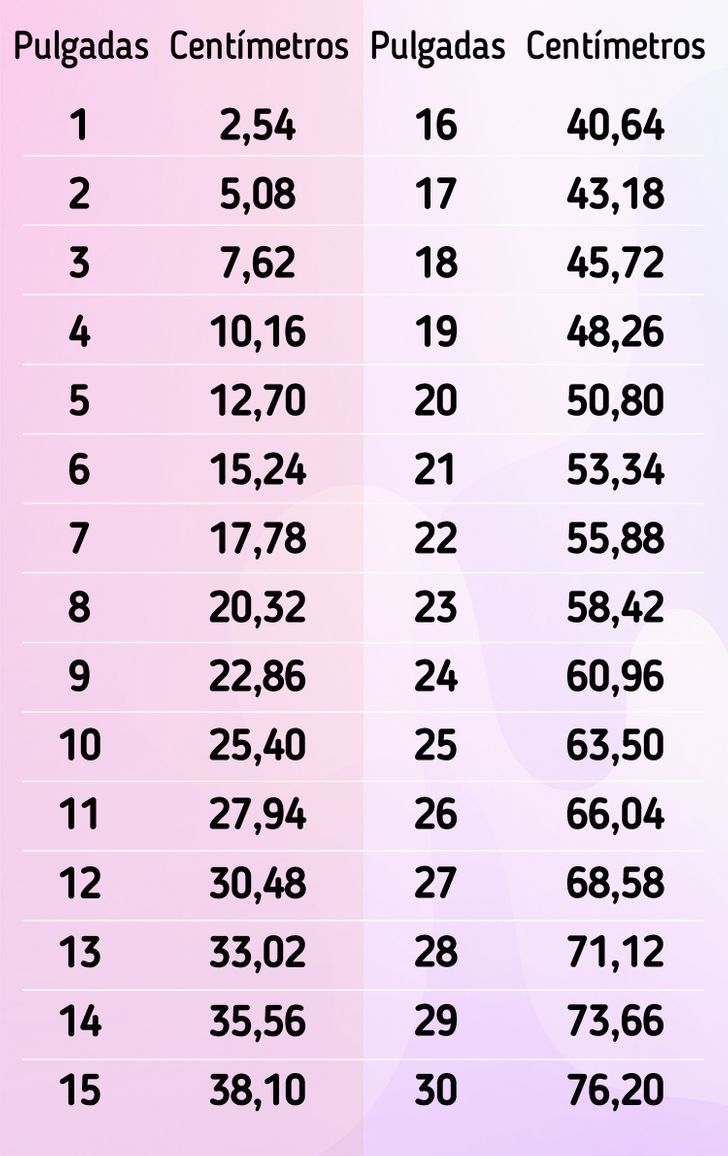
The core mathematical anchor is straightforward: one international inch measures exactly 2.54 centimeters. Yet applying that basic unit to a panel mounted on drywall or recessed into an entertainment center requires navigating aspect ratios, chassis bezels, and human visual acuity thresholds. Bridging the gap between imperial marketing labels and metric room layouts prevents costly installation errors.
📌 Key Takeaways:
- The Exact Conversion Factor: One standard inch equals precisely 2.54 centimeters under the 1959 International Yard and Pound Agreement.
- Diagonal Geometry: Advertised display sizes represent corner-to-corner viewable glass, omitting cabinet edges, sound bars, and outer bezel frames.
- Spatial Planning: A standard 16:9 television panel yields roughly 87% of its diagonal measurement in horizontal width and 49% in vertical height.
The Mathematical Origin of the 2.54 Centimeters Standard
The inch once lacked uniform precision across borders. British, Canadian, and American industrial yards varied by fractions of a millimeter throughout the early 20th century, creating minor headaches for precision engineering and tooling tolerances. That divergence ended on July 1, 1959, when representatives from six English-speaking nations signed the International Yard and Pound Agreement. The treaty formally locked 1 yard to 0.9144 meters, which permanently defined 1 inch as exactly 25.4 millimeters, or 2.54 centimeters.
The basic conversion formula requires simple multiplication:
Centimeters = Inches × 2.54
To convert centimeters back to inches, divide the metric length by 2.54 or multiply by 0.393701. While a manual calculation works instantly on any smartphone unit conversion calculator, consumer electronics packaging complicates things. When a panel is labeled 65 inches, you are reading a single diagonal vector, not the real-world horizontal footprint of the cabinet.
Why the Electronics Industry Measures Displays Diagonally
The practice of measuring screens along the diagonal is a mechanical relic from early cathode-ray tube (CRT) manufacturing. Engineers during the mid-20th century fabricated vacuum tubes inside circular glass bulbs. Because circular picture tubes were sold by outside diameter, measuring the widest span across the glass face gave buyers the primary index of display capacity.
When rectangular shadow-mask CRTs entered living rooms during the 1950s, manufacturers continued charting the diagonal dimension. It offered marketing teams a clever perceptual bonus: diagonal figures produce the highest single measurement number possible for any rectangular surface. A 55-inch panel sounds substantially larger to casual shoppers than a 48-inch-wide box, even though both descriptions characterize the exact same device.
The 16:9 Aspect Ratio: Calculating Actual Width and Height
Modern commercial televisions adhere to the widescreen 16:9 aspect ratio standardized by the Society of Motion Picture and Television Engineers (SMPTE). For every 16 units of horizontal image width, the display presents 9 units of vertical height. This fixed geometry allows you to calculate the precise dimensions of the viewable panel from the diagonal measurement using the Pythagorean theorem.
If D represents the advertised diagonal in inches, the mathematical breakdown for viewable area is:
- Panel Width (Inches) = D × (16 / √(16² + 9²)) = D × 0.8716
- Panel Height (Inches) = D × (9 / √(16² + 9²)) = D × 0.4903
Converting those results into centimeters simply requires multiplying each axis by 2.54. Consequently, the viewable glass width is D × 2.2138 cm, and the viewable glass height is D × 1.2453 cm.
| Diagonal Size | Diagonal (cm) | Viewable Width (cm) | Viewable Height (cm) | Mixed-Use Seating Distance |
|---|---|---|---|---|
| 43 Inches | 109.2 cm | 95.2 cm | 53.5 cm | 1.3, 1.8 meters |
| 50 Inches | 127.0 cm | 110.7 cm | 62.3 cm | 1.5, 2.1 meters |
| 55 Inches | 139.7 cm | 121.8 cm | 68.5 cm | 1.7, 2.3 meters |
| 65 Inches | 165.1 cm | 143.9 cm | 80.9 cm | 2.0, 2.7 meters |
| 75 Inches | 190.5 cm | 166.0 cm | 93.4 cm | 2.3, 3.1 meters |
| 85 Inches | 215.9 cm | 188.2 cm | 105.8 cm | 2.6, 3.5 meters |
| *Note: Viewable widths omit external chassis bezels (typically adding 0.5, 2.5 cm total) and table mounting feet. | ||||
Accounting for Screen Bezels and Mounting Hardware
The numbers listed on retail spec sheets account strictly for the active pixel matrix. In actual home installations, failure to account for external enclosure trim causes clearance failures in media cabinetry.
High-end OLED and Mini-LED sets feature ultra-narrow bezels ranging between 0.3 and 0.8 cm on each side. Entry-level direct-lit LED sets use thicker frames measuring 1.2 to 2.0 cm to accommodate structural ribbing and backlighting diffusers. When mounting a display inside a pre-built credenza alcove, add at least 3 to 5 cm to your calculated metric width to accommodate the chassis frame, ventilation clearance, and side-access HDMI cable connections.
Depth variations present an even wider spread. While an OLED panel may measure under 0.6 cm at its thinnest edge, the component housing containing the power supply and tuner bumps the rear depth to 4 or 5 cm. If you plan to install a low-profile wall bracket, verify whether downward-facing or side-facing ports require extra clearance away from the wall surface.
Field-of-View Standards: Determining Optimal Seating Distance
Selecting an ideal television size involves matching physical panel dimensions to the human visual field. The two primary bodies setting display placement standards are the Society of Motion Picture and Television Engineers (SMPTE) and THX Ltd.
SMPTE guidelines recommend that a display occupy a minimum 30-degree visual field for general broadcast viewing, news, and sports. To calculate this distance in metric units, multiply the screen diagonal in inches by 4.06 to find the recommended distance in centimeters. For a 65-inch screen, that places the sofa roughly 2.64 meters away.
THX recommends a more immersive 40-degree field of view for cinematic content to mirror commercial movie theater seating. The THX formula multiplies the screen diagonal in inches by 3.05 to determine the viewing distance in centimeters. Under this standard, the same 65-inch television performs best when positioned 1.98 meters from the primary seat. With 4K and 8K resolutions standard across all price tiers, individual pixels remain invisible even at these closer, theater-style distances.
Computer Monitors vs. Televisions: The Aspect Ratio Divergence
Applying standard television conversions to desktop monitors creates unexpected sizing errors. While consumer televisions stay locked into 16:9, computer monitors use varied aspect ratios optimized for vertical productivity or ultra-wide workflow environments.
Professional desktop monitors frequently employ 16:10 panels (such as 1920×1200 or 2560×1600), adding substantial vertical height compared to a television of identical diagonal length. An ultrawide monitor with a 21:9 or 32:9 ratio spreads its diagonal dimension across an extended horizontal plane. A 34-inch 21:9 monitor delivers roughly the same vertical working height as a standard 27-inch 16:9 display, despite showing a much higher diagonal spec number on the box. Always calculate width and height independently using aspect ratio formulas when swapping between office desk monitors and living room screens.
Frequently Asked Questions (FAQ)
Q1: Why do European and Latin American retailers still advertise televisions in inches?
A1: International panel fabrication foundries in South Korea, Taiwan, Japan, and China manufacture mother glass substrate sheets using imperial standard sizing inherited from early electronic display history. Because component glass is produced, traded, and categorized globally in inches, international brands retain the measurement on retail packaging alongside mandatory metric equivalents.
Q2: How much physical width should I reserve for a 65-inch television?
A2: The active display surface of a 65-inch 16:9 screen measures 143.9 cm wide. After adding modern edge bezels (0.8, 1.5 cm per side), the total physical width lands between 145.5 cm and 147.0 cm. Allow at least 150 cm of wall or cabinet clearance to leave space for ambient airflow and cable routing.
Q3: Will a television look too pixelated if I sit closer than the recommended metric distance?
A3: On modern 4K displays (3840×2160 pixels), visible pixel structures disappear to normal human vision at distances greater than 1 meter. The viewing distance limits suggested by SMPTE and THX are designed around visual comfort and eye-tracking fatigue across the field of view, rather than panel resolution constraints.
Room Planning Guidelines for Displays in 2026
Modern display design trends prioritize expanding display areas into smaller residential spaces. Narrower bezel tolerances and brighter Mini-LED and QD-OLED backlights allow larger diagonals to fit into spaces once limited to 50-inch screens. As 75-inch and 85-inch screens become standard baseline sizes, measuring with a physical metric tape before purchasing remains the safest approach.
Always map wall allocations by horizontal width and vertical cabinet clearance rather than trusting advertised diagonal inches alone. Multiply the diagonal specification by 2.54 to confirm total centimeters, apply the 0.8716 multiplier to reveal active width, and factor in at least 5 cm of extra frame and cable breathing room. Taking five minutes to run those figures turns an awkward conversion into a clean, permanent installation.


