How to Write 'From' and 'To' Addresses on Envelopes: The Definitive Step-by-Step Guide

Every year, postal services around the globe redirect or discard millions of undeliverable letters simply because the exterior formatting confused high-speed processing machinery. While composing formal mail, whether submitting manuscripts, corresponding with government representatives as detailed in writing guides like the nytimes.com Report on public open letters, or sending billing notices, requires thoughtful prose, the physical container demands mathematical consistency.
Automated sorting hubs read envelopes from the bottom up, scanning text in milliseconds through optical character recognition (OCR). A misplaced suite number, faint ink, or transposed name can instantly bump a piece of mail into manual review, delaying transit by days or forcing an immediate return.
📌 Quick Summary:
- Sender Zone: Write the return address in the top-left corner, keeping all lines flush left with full sender contact information.
- Recipient Zone: Center the destination address horizontally and vertically, finishing with a standard city, state abbreviation, and ZIP code.
- Automation Clearance: Leave the bottom 5/8-inch of the envelope completely blank for postal barcode printing.
Where Envelope Architecture Meets Modern Optical Scanners
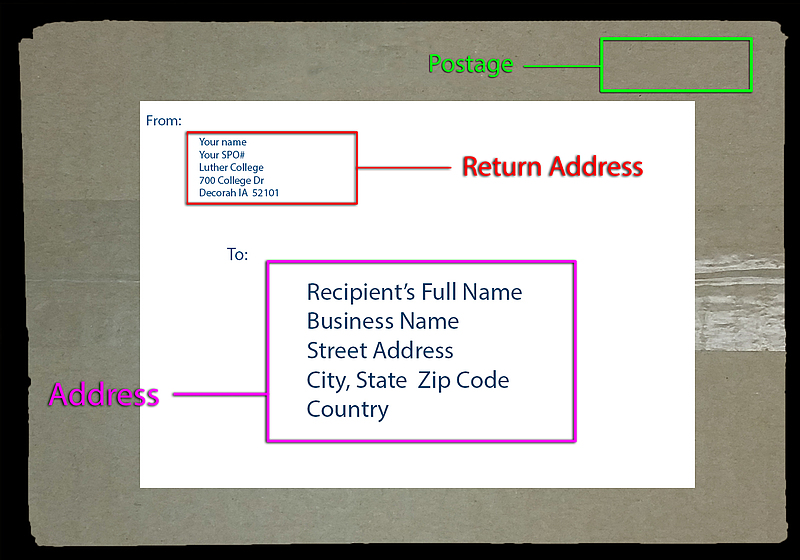
A standard business envelope (#10) or card envelope (A7) is divided into three distinct operational zones. Knowing these zones prevents the automated cameras at regional distribution centers from confusing the sender with the recipient.
Postal automated sorting systems sweep physical mail across high-velocity transport belts running at speeds up to 15 miles per hour. When high-resolution cameras capture the envelope's face, the software immediately searches the optical reading zone, the center-right area, to determine the regional distribution hub, local station, and individual carrier route.
If a return address stretches too far toward the center, or if sender contact information sits on the back flap in an unsupported format, sorting machinery may read the wrong line first. In worst-case scenarios, the letter bounces directly back to your own mailbox the following morning.
Sender Placement: Upper Left Rules and Return Address Safety
The return address placement belongs exclusively in the top-left corner of the envelope's front face. This block informs the carrier where to return the item if the destination address is invalid, vacant, or refused.
Maintain at least a 1/4-inch margin from the top and left paper edges. This spacing ensures that mechanical feed belts do not smudge your handwriting or obscure printed toner.
Line 1 contains your full name, professional title, or organization name. Line 2 holds your street address, along with any secondary unit details. Line 3 specifies the city, standard two-letter state abbreviation, and the five-digit ZIP code.
Printing or writing a return address is not merely an administrative formality. Unmarked envelopes that encounter delivery issues are redirected to the postal service’s dead letter facilities, where mail is held, opened by authorized investigators to identify ownership, or destroyed.
Destination Placement: Setting the Recipient Mailing Address
The recipient mailing address sits directly in the center of the envelope, serving as the primary delivery address line target for mail processing equipment.
Always write the recipient's legal name on the first line. When sending to a business, write the individual’s name first, followed by the company or department name on the line immediately below.
Keep every line parallel to the bottom edge of the envelope. Slanted text forces the OCR scanner to recalculate baseline angles, increasing error rates during automated transit.
Punctuation should be minimized. While commas and periods feel natural in formal writing, USPS addressing guidelines recommend omitting commas between the city and state, and avoiding periods after abbreviations like "St" or "Apt." Clean, unpunctuated text produces cleaner digital scans.
Secondary Units: Suite and Apartment Numbers Without Delivery Errors
Missing secondary units represent one of the most common causes of returned residential and commercial mail. Apartment numbers, suite designations, and floor indicators must appear on the same horizontal line as the street address.
If space runs short, place the secondary unit directly above the street address line rather than below it. Postal automation reads bottom-to-top; the line right above the city and state must contain the primary street delivery point.
Always use standard postal abbreviations. Write "APT" for apartment, "STE" for suite, "BLDG" for building, and "RM" for room. Avoid using the pound or hashtag sign (#) when possible, as optical software occasionally misreads the hash mark as a number 1 or an unreadable character.
ZIP Code Formatting and Regional Routing Requirements
ZIP code formatting dictates the exact speed and path your envelope follows through distribution centers. Standard mail relies on the conventional five-digit code, which pinpoints the destination post office or delivery station.
When maximum delivery reliability is required, append the four-digit add-on code to create the ZIP+4 format. These four additional digits narrow the drop point down to a specific city block, office building, or apartment floor.
Separate the primary five-digit code and the four-digit routing add-on with a clean hyphen (e.g., 90210-4321). Leaving a plain space instead of a hyphen can cause software to interpret the add-on as an invalid number string.
Envelope Layout Rules Across Major Mail Formats
Handling standard letters, flat oversized envelopes, and parcels requires slight layout shifts to keep processing clean across different conveyor lines.
| Mail Format | Return Address Zone | Recipient Address Zone | Clearance Margin |
|---|---|---|---|
| Standard Letter (#10) | Top-left corner; 0.25-inch margin from edges | Optical center; flush left text block | Maintain bottom 0.625-inch barcode clear zone |
| Large Envelope / Flat (9x12) | Top-left corner on the longest dimension | Center-right quadrant; prominent scale | Keep 1-inch clear space around entire label |
| Shipping Package / Box | Top-left of primary shipping face | Centered on the largest flat surface | Never place across seam, fold, or tape line |
Postage Stamp Placement and Letter Mailing Standards
Postage stamp placement sits permanently in the upper-right corner of the envelope. This corner aligns with the mechanical canceler, which applies the cancellation watermark and date stamp.
Standard letters must remain flat, flexible, and rectangular. If an envelope contains rigid enclosures such as USB drives, keys, or thick wax seals, it cannot flex across sorting rollers. Rigid letters incur non-machinable surcharges and require specialized manual handling.
Maintain adequate clear space below the recipient block. The bottom 5/8-inch of the envelope must remain entirely clear of writing, logos, or stickers. Postal barcode systems print fluorescent orange or black delivery point routing barcodes across this bottom strip.
Handling Cross-Border Envelopes and International Mail Formatting
Sending mail past national borders requires adjustments that satisfy both domestic export sorters and the destination country's local postal authority.
The recipient block must conclude with the full destination country name written in uppercase English letters on the very last line. Never combine the city, postal code, and country name onto a single row.
Different regions position postal codes differently. While the United States places the ZIP code after the state name, several European nations, such as Germany or the United Kingdom, place postal codes before the town name or on an independent line. Transcribe the international recipient's local layout exactly as provided, but always isolate the final country name on the bottom line.
Frequently Asked Questions (FAQ)
Can I write the return address on the back flap of a standard letter?
While social stationery and wedding invitations frequently place the sender details on the back flap, automated sorting facilities prefer the front upper-left corner. Envelopes with back-flap addresses may experience sorting delays if automated machinery fails to detect an origin address during delivery exceptions.
What ink colors are acceptable for addressing mail?
Black and dark blue inks provide the highest optical contrast against standard white or manila paper. Avoid light ink tones, metallic gels, and red inks, as red illumination used inside sorting cameras can render colored text invisible to optical sensors.
Where do I write attention lines for corporate recipients?
Place the attention line (e.g., "ATTN: JANE SMITH") on the first line of the recipient address block, right above the organization's legal name, or place the recipient's name on line one and the company name on line two.
Verification Checklist for Clean Envelope Dispatch
Before sealing and posting physical correspondence, confirm that the recipient's name and primary street address occupy the optical center of the envelope, clear of the stamp zone. Verify that secondary unit designations such as suite or apartment numbers share the street row or sit directly above it, rather than below. Ensure the bottom 5/8-inch strip is clean and free of markings, and check that the return address sits flush against the upper left margin. Following these structural rules guarantees that automated postal networks route your mail swiftly to its intended destination without interruption.