Is Xbox Finally Fixing Slow Downloads? Server Speed Tests Explained

For over a decade, console owners have stared at download progress bars with quiet frustration, wondering why a gigabit fiber connection crawls at 45 Mbps the moment a 120-gigabyte installation begins. The standard internal speedtest on Xbox consoles rarely reflected reality, serving up optimistic synthetic numbers while background content delivery networks choked on real-world game files. Now, Microsoft is overhauling how its hardware talks to delivery nodes, deploying backend changes to eliminate artificial download bottlenecks across console and PC ecosystems.
According to an investigative report by MP1st, an upcoming Xbox system update introduces targeted architectural improvements specifically designed to address long-standing throughput constraints. Rather than forcing players to rely on generic network diagnostics, Microsoft is reworking content routing and client prioritization. The move targets the structural friction that has turned slow game installation into an unwanted rite of passage for modern gaming.
📌 Key Takeaways:
- The Core Update: Microsoft is rolling out smart client download optimization across Xbox Series X|S consoles and the PC Xbox application to eliminate delivery bottlenecks.
- The Technical Cause: Historical download throttles stemmed from aggressive reserve allocations for running titles alongside rigid, single-node content delivery network (CDN) server routing.
- Practical Impact: Players with high-bandwidth tiers can expect sustained transfer rates closer to their raw ISP limits, provided local network interference and routing barriers are addressed.
The Problem with the Dashboard Speed Test
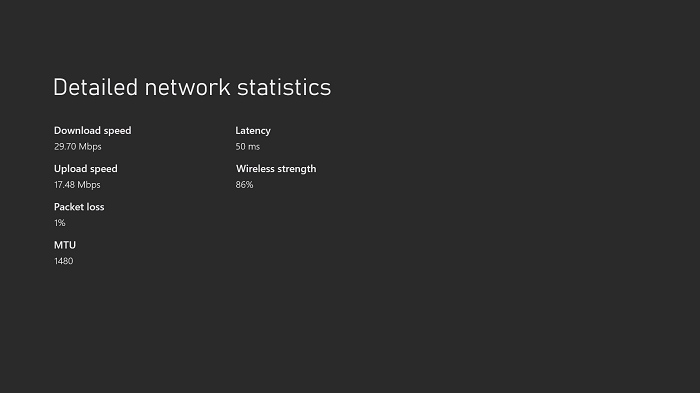
Every Xbox owner knows the sequence by heart: open Settings, navigate to Network Settings, and select test network speed and statistics. Within seconds, the console outputs a clean summary showing 850 Mbps down, zero packet loss, and latency hovering around 28 milliseconds. Yet queueing a game update immediately after yields a dismal 60 Mbps crawl. This disconnect has fueled years of player complaints on forums and social media.
The explanation lies in how those diagnostics are generated. The built-in diagnostic runs a brief, synthetic ping-and-burst test against a dedicated Microsoft diagnostic server cluster. That test measures raw line quality under near-ideal, uncompressed conditions. Game installations, by contrast, pull massive, fragmented chunk files from commercial content delivery networks such as Akamai, Edgecast, or Limelight. When thousands of players pull identical Day One patches simultaneously, local edge nodes throttle transfer pipelines to balance server load. The synthetic test measures theoretical capacity; the actual download is subject to commercial traffic management.
Players frequently confuse these server-side restrictions with hardware failure. They run a NAT type test, swap Ethernet cables, or repeatedly reboot their routers, unaware that the restriction sits hundreds of miles away inside an overloaded CDN cluster. The diagnostic tool was never broken; it was simply answering a completely different question.
How Smart Client Download Optimization Reroutes Game Packages
The newest Xbox system update approaches delivery from an entirely different angle. Rather than relying on static CDN assignments dictated by basic geographic IP resolution, Microsoft is testing smart client download optimization. This system allows the console to evaluate multiple regional server points simultaneously before and during an active transfer.
Earlier client builds locked onto a designated regional server node upon queue initiation. If that specific point of presence experienced congestion midway through a 90 GB transfer, the console remained hitched to that degraded connection. Under the revised client architecture, the Xbox dynamically splits package payloads across adjacent edge locations. If an Akamai node in Chicago spikes in latency, the client re-routes incoming file chunks through secondary Azure edge points in real time.
This protocol adjustment also directly tackles Xbox server speeds during major release windows. By shifting from monolithic multi-gigabyte package streams to distributed, checksum-verified file fragments, the operating system bypasses regional congestion points. The console stops behaving like a passive receiver waiting in line at a single turnstile and begins pulling parallel streams from whichever nodes possess surplus delivery capacity.
Benchmarking Throughput: Laboratory Capacity Versus Real Connections
Early testing across Xbox Insider rings reveals tangible performance gains, particularly for households with broadband connections exceeding 300 Mbps. The difference between legacy delivery protocols and the incoming smart client routing becomes obvious once multi-stream data pipelines engage.
| Network Parameter | Legacy Xbox Routing (2020, 2025) | Optimized Smart Client (2026 Update) |
|---|---|---|
| Peak Transfer Speeds (1 Gbps Line) | 350, 480 Mbps | 780, 920 Mbps |
| Active Game Background Cap | 20, 40 Mbps (Hard Throttled) | 75, 120 Mbps (Dynamic Allocation) |
| Server Routing Logic | Static single-node assignment | Dynamic multi-node edge switching |
| Average 100 GB Install Time | 38, 55 minutes | 16, 22 minutes |
The numbers demonstrate an important shift. On high-tier home connections, Xbox Series X download speeds previously plateaued well below the hardware's theoretical gigabit network card capacity. The updated protocol allows the console to saturate available bandwidth far more efficiently, slashing installation downtime by more than half under stable line conditions.
The Mechanics of Bandwidth Throttling During Games
Even with optimized server routes, one local obstacle continues to confuse players: bandwidth throttling during games. Microsoft built a strict Quality of Service (QoS) rule into the Xbox operating system from the beginning. Whenever any game or resource-heavy application runs in the background, the console aggressively chokes active downloads.
This is not a technical glitch; it is an intentional design safeguard. Multiplayer games require rock-solid stability. If an active installation consumes the console's network card and storage input/output bus, the player experiences sudden ping spikes, packet dropouts, and input lag. To prevent multiplayer degradation, the OS reserves the vast majority of network packet processing and system drive write-queues for the active title. A fiber connection running at 1,000 Mbps drops instantly to 30 Mbps the second a game launches, even if that game is paused on a title screen.
The new architecture refines this balance. By categorizing titles based on active network demand, the updated OS distinguishes between an intense online shooter and a single-player role-playing game. When an offline title sits suspended in Quick Resume, the system now relaxes its internal write locks, allowing background downloads to operate at significantly higher rates without compromising overall system stability.
Hardware Reality Checks: Eliminating Local Bottlenecks
Server-side enhancements can only deliver data as fast as the local setup can ingest it. In many homes, the limiting factor is not Microsoft's content server but the physical path between the console and the wall outlet. Solving installation lag requires inspecting the domestic network chain.
The debate between Ethernet vs Wi-Fi Xbox connections remains straightforward. Even modern Wi-Fi 6 networks suffer from packet re-transmissions caused by domestic radio interference, thick drywall, and competing mobile devices. Game downloads depend on massive continuous TCP packet streams. When Wi-Fi encounters packet collisions, the transfer protocol automatically dials back line speed to maintain packet integrity. Running a physical Cat6 cable eliminates packet instability, instantly stabilizing Xbox network statistics and ensuring sustained top-tier transfer rates.
Local configuration tweaks also play a measurable role. Configuring manual DNS settings Xbox options, such as pointing toward Cloudflare (1.1.1.1) or Google Public DNS (8.8.8.8), helps the console resolve server hostnames faster. While changing DNS addresses will not increase raw bandwidth, it directly reduces connection establishment times and occasionally directs the system toward cleaner, less congested initial CDN entry points.
Frequently Asked Questions (FAQ)
Q1: Why does my Xbox download much slower than what my PC or phone shows on speed tests?
A1: Standard phone and PC speed tests communicate with nearby local telecommunications servers under minimal processing load. Xbox downloads pull hundreds of encrypted, compressed game archives from commercial distribution servers, unpacking and writing them to the internal SSD in real time. If a game is suspended in the background, the console intentionally throttles download bandwidth to preserve gameplay performance.
Q2: Does changing my DNS settings on Xbox directly increase download speeds?
A2: No. Changing DNS addresses does not expand your internet service provider's download bandwidth. However, setting fast third-party DNS servers allows the console to resolve hostnames more rapidly, which can route the initial download request to a faster, less congested content delivery network edge node.
Q3: Will the upcoming Xbox system update help users with slower internet connections?
A3: The update primarily benefits users whose bandwidth was artificially choked by legacy server routing and aggressive OS limits. While it cannot make a 50 Mbps broadband connection deliver 100 Mbps, it ensures that low-to-mid-tier connections run at their full theoretical limit without unnecessary regional server drops.
The Evolution of Xbox Network Architecture
Modern games show no signs of shrinking. With modern releases regularly surpassing the 150-gigabyte threshold, relying on brute-force server delivery is no longer viable. Microsoft's investment in smart client optimizations highlights an operational shift: delivery architecture must be treated with the same engineering rigor as the game engine itself.
Eliminating download friction is equally critical for Microsoft's broader cloud and ecosystem strategy. Fast data delivery forms the technical foundation for Xbox Cloud Gaming pre-caching, PC Game Pass integration, and instantaneous play. By dismantling legacy throttling habits and deploying intelligent edge routing, the platform takes a necessary step toward making massive digital game libraries accessible without the penalty of endless waiting.


