Spring Cleaning Your Setup: The New Pro Routine for Desks and Mousepads
Run your fingernail firmly across the center of your desk surface right now. If it carves a pale, powdery white line across the weave, your surface is saturated with dried sweat, shedding epidermal cells, atmospheric dust, and evaporated coffee mist. As chronicled in a candid How-To Geek Report detailing months of neglected workstation hygiene, the sheer volume of grime trapped within everyday textiles routinely shocks even seasoned tech enthusiasts. Most users blame aging PTFE mouse skates or sensor stutter for micro-aim inconsistencies when the real culprit sits flat across their mahogany veneer.
Desk pads serve as passive filters for every physical contact point in your workstation. Over months of heavy keyboard clatter and intense wrist friction, microscopic grit embeds deep into the synthetic weave. This buildup disrupts optical reflection angles and introduces uneven drag coefficients. Restoring your tracking surface requires precise physical intervention rather than careless laundry habits.
📌 Key Takeaways:
- The Root Problem: Microscopic sebum and dead skin pack tightly into cloth weaves, causing optical sensor jitter and inconsistent dynamic friction.
- The Golden Standard: A lukewarm soak paired with mild dish soap and a soft bristle brush lifts compacted oils without eroding water-repellent weaves.
- Critical Hardware Hazards: Washing machines and high-heat drying cycles strip glue laminates, warp cellular rubber backing, and destroy internal RGB diffusers.
The Microscopic Buildup Ruining Optical Sensor Glide
Modern optical sensors track micro-textures on your desk surface at frequencies exceeding 8,000 Hz. When skin sebum bonds airborne dust particles onto polyester fibers, those woven pockets flatten into slick, greasy plateaus. The sensor experiences erratic lift-off distances and tracking jitter because light bouncing back into the optical lens refracts unevenly through oil deposits.
Friction characteristics degrade long before stains become visible to the naked eye. Gamers often notice their cursor feeling muddy during micro-adjustments, prompting them to crank up DPI settings or replace worn mouse skates. Removing dead skin oils resets dynamic and static friction profiles back to factory zero. A clean cloth gaming mat provides predictable glide characteristics across every square centimeter of surface area, ensuring fast swipes and tight stops track true to your muscle memory.
The Gentle Immersion Protocol for Cloth Mats
Standard woven mats require wet agitation to break down dried dermal lipids. Harsh detergents strip the delicate silicone or polyurethane coatings common on competitive speed pads, so stick to basic chemistry.
- Submerge in Lukewarm Water: Fill a clean bathtub or deep basin with warm water sitting around 35°C to 40°C. Scorching hot water softens water-based bonding glues holding the cloth surface to the rubberized base.
- Apply Surfactant: Drizzle roughly 10 to 15 ml of mild dish soap directly over the wet textile. Pure liquid dish soap targets animal and human fats without leaving synthetic moisturizing residues behind.
- Work the Fibers: Take a soft bristle brush or a clean microfiber cloth and work across the entire surface using light, circular motions. Focus extra attention along the bottom edge where forearms deposit heavy concentrations of sweat. Avoid aggressive downward force that pushes bristle ends straight through the knit.
- Rinse Until Clear: Flush the surface repeatedly under running tap water until foam ceases entirely. Soap residue left inside the weave attracts airborne dust twice as fast once dry.
Cleaning Methods Compared: Performance Gains Versus Hardware Risks
Choosing how to scrub your desk mat depends heavily on construction materials, edge stitching, and embedded electronics. Taking shortcuts with laundry appliances frequently delaminates premium multi-layer pads within a single cycle.
| Cleaning Methodology | Oil Extraction Efficiency | Structural Risk Profile | Ideal Pad Types |
|---|---|---|---|
| Basin Soak & Soft Brush | 95%, 98% oil extraction | Very low mechanical stress | Standard cloth, hybrid cordura, stitched pads |
| Machine Washing Cycle | 85%, 90% oil extraction | High risk of substrate delamination | Cheap, disposable unstitched mousepads only |
| Surface Wipe Down | 40%, 50% oil extraction | Zero immersion hazard | RGB edge-lit pads, leather blotters, hard resin |
| Spot Solvent Cleaners | 60%, 70% spot removal | Chemical coating degradation | Hard plastic mats, glass surfaces (avoid on cloth) |
Washing machine risks extend beyond structural ripping. Centrifugal spin cycles twist high-density natural rubber bases out of alignment. Once that cellular rubber stretches, the mat refuses to lie perfectly flat on your desk, creating permanent bubbling ridges that ruin sensor tracking glide.
Protecting Edge Stitching and Base Adhesives
Stitched edges care requires specialized handling. Premium mousepads feature edge overlocking designed to prevent the textile surface from fraying away from the dense foam base. Scrubbing hard across these seams with rough nylon bristles shreds the fine filament threads. Keep your brush strokes moving parallel to the stitched border rather than pushing bristles beneath the seam edges.
Delamination represents an irreversible hardware failure. Mousepad makers join synthetic fabrics to open-cell natural rubber foams using heat-activated adhesives. Exposing these mats to water temperatures above 45°C dissolves the adhesive bond line. If the outer textile separates from the rubber bottom, no amount of clamping or household glue will restore the original, uniform tracking resistance.
Safe Maintenance for RGB and Powered Desk Mats
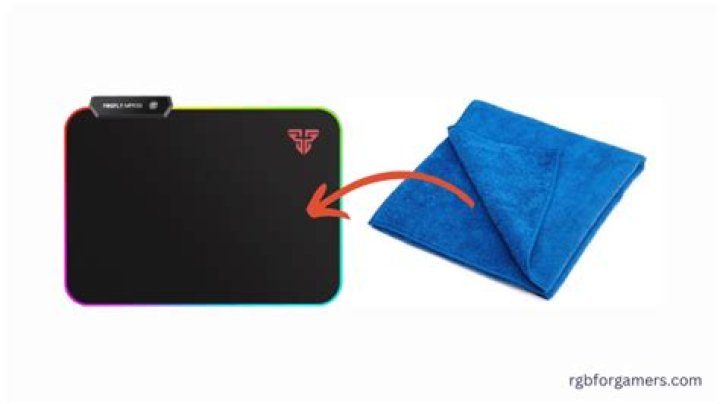
Illuminated desk mats require an entirely dry workflow. Liquid seeping into the controller box short-circuits internal SMD boards, while moisture trapped alongside optical filament tubes causes internal mold spotting that dulls light output permanently. RGB mousepad cleaning demands a disciplined topical approach:
Disconnect the USB interface before beginning any work. Dampen a lint-free microfiber cloth with a very dilute solution of warm water and a single drop of mild dish soap, wringing it out until almost dry to the touch. Support the mat on a hard table and wipe systematically in long horizontal passes. Never spray liquid directly onto the mat face. Clear soap residue with a second damp cloth rinsed in pure distilled water, taking special care to steer clear of the transparent nylon threading holding the edge light pipe in place.
Air Drying Protocols: Avoiding Heat and Structural Warp
Drying your mat incorrectly undoes all the effort invested into washing it. Never tumble dry a mousepad inside a household clothes dryer. The rotational drum heat scorches synthetic microfibers, turns natural foam bases into crumbly sponge dust, and permanently shrinks the edges. Hair dryers present similar hazards by concentrating extreme thermal pockets directly over thin glues.
Employ natural air drying techniques instead. Lay the dripping mat completely flat over a pair of clean, dry bath towels. Roll the towels around the mousepad like a sleeping bag, then press firmly with open palms to draw out excess bulk moisture without bending the internal rubber structure. Unroll the assembly and place the mat flat on a ventilated drying rack away from direct ultraviolet sunlight. Expect full air evaporation to take between 24 and 36 hours depending on ambient room humidity. Reinstalling a damp mat invites mildew and corrodes internal mouse components from rising vapor.
Frequently Asked Questions (FAQ)
Q1: Can I use isopropyl alcohol to lift grease stains quickly from a cloth pad?
Avoid applying isopropyl alcohol to cloth gaming mats. Alcohol dissolves the adhesives binding the fabric to the cellular rubber base and degrades specialized surface coatings applied to enhance speed. Reserve alcohol wipes strictly for hard plastic, glass, or metal tracking surfaces.
Q2: How often should I perform a deep warm water soak on my primary desk mat?
A thorough wash every three to four months keeps sensor tracking glide consistent for everyday remote workers and gamers. If your palms sweat heavily during intense sessions, or if you eat meals at your computer desk, schedule a wash every six to eight weeks to keep oils from hardening into permanent slick spots.
Q3: Why does my mousepad feel much slower after washing and drying it?
Sluggish glide on freshly washed mats almost always indicates trapped soap residue. Detergent that is not rinsed thoroughly acts like a sticky film that grabs your mouse's PTFE skates. Submerge the mat once more in pure lukewarm water, agitate gently with a clean cloth without adding soap, and rinse until the drainage runs completely clear.
Establishing a Reliable Desk Mat Maintenance Routine
A pristine desk surface directly influences everyday computing performance. Integrating routine surface wiping alongside periodic deep baths protects your financial investment in high-end peripherals. Wipe your desk pad down with a dry microfiber cloth once a week to capture loose debris before hand pressure grinds it into the weave. By matching your wash technique to the specific construction of your mat, you maintain true sensor fidelity, preserve edge stitching, and sustain consistent mouse speed across years of daily use.