What Is Mouse Polling Rate? The Complete Guide to Hz, Latency, and Settings
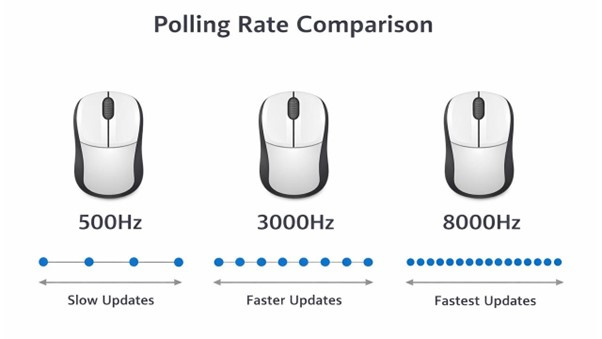
Peripheral manufacturers spent years pushing optical sensor sensitivities past 30,000 DPI, but competitive gaming hardware in 2026 has shifted its arms race toward an entirely different metric: frequency. According to laboratory testing from the RTINGS.com Report on wireless flagships, high-polling mice capable of reporting intervals up to 8,000 times per second have moved from exotic engineering showcases to retail store shelves. Flagship releases like the Razer DeathAdder V4 Pro and Logitech's Superstrike series treat high-frequency transmission as standard protocol rather than an optional gimmick.
Yet cranking a wireless pointer up to astronomical refresh brackets introduces measurable tradeoffs that peripheral packaging routinely glosses over. Doubling or octupling reporting frequency places heavy computational demands on your system, shortens battery life, and can trigger frame drops in unoptimized game engines. Understanding what polling rate actually measures, and where its benefits hit steep diminishing returns, separates genuine competitive advantages from placebo marketing.
📌 Quick Summary:
- Core Definition: Polling rate, measured in Hertz (Hz), indicates how many times per second a mouse sends tracking data to your computer operating system.
- The Latency Math: Jumping from 125Hz to 1,000Hz drops hardware report latency by 7ms, whereas moving from 1,000Hz to 8,000Hz shaves off less than 0.88ms.
- System Tradeoffs: Extreme 4,000Hz and 8,000Hz rates require potent multi-threaded CPUs, draining wireless mouse batteries up to four times faster and risking micro-stuttering on older game engines.
How Mouse Polling Rate Dictates Input Latency and Response Times
Polling rate, often labeled as report rate, refers to the frequency with which a mouse controller communicates sensor position, click packets, and scroll data across the USB bus or wireless receiver. The value is expressed in Hertz (Hz). A standard office mouse operating at 125Hz communicates once every 8 milliseconds (ms). A mainstream gaming pointer set to 1,000Hz reports every 1ms.
When you swing your crosshair across a tactical shooter map, your computer does not see continuous real-time movement. It receives individual coordinate snapshots. The formula governing report latency is straightforward:
Latency (in milliseconds) = 1,000 / Polling Rate (in Hz)
At 125Hz, positional data can be delayed by up to 8ms before your PC receives the update. At 500Hz, that delay drops to 2ms. At 1,000Hz, communication delay shrinks to 1ms. Modern hyper-polling peripherals operating at 4,000Hz and 8,000Hz compress those transmission windows down to 0.25ms and 0.125ms respectively.
This transmission interval does not eliminate sensor processing delay or pixel transition times on your screen. It simply minimizes the idle window during which fresh tracking data sits queued in the mouse buffer waiting for an operating system request.
DPI vs. Polling Rate: Resolving the Input Confusion
Gamers frequently confuse Dots Per Inch (DPI), technically Counts Per Inch (CPI), with polling rate. They measure two completely distinct layers of peripheral input.
DPI dictates spatial sensitivity. It determines how many individual counts your mouse sensor registers when moved across one physical inch of mousepad surface. If you operate at 800 DPI, moving the mouse one inch outputs 800 discrete coordinate steps. If you set your peripheral to 3,200 DPI, that same physical inch sends 3,200 coordinate steps, making on-screen movement far faster or allowing micro-adjustments within higher-resolution pixel grids.
Polling rate determines temporal resolution. It dictates how many times every second those coordinate steps get reported to Windows, macOS, or Linux. If you pair an extremely low DPI like 400 with an 8,000Hz polling rate, the mouse controller is ready to speak to your CPU 8,000 times per second, but slow hand movements may not generate enough positional counts to populate every report window.
To feed high-polling transceivers saturated data packets, competitive testing from community benchmarks shows that tracking consistency improves when running a base DPI of at least 1,600 DPI to 3,200 DPI, scaling down in-game sensitivity sliders to compensate.
The Polling Frequency Breakdown: Latency, CPU Overhead, and Battery Demands
Higher numbers look compelling on product boxes, but processing inputs at extreme frequencies requires significant computing power. Every report triggers a hardware interrupt that your central processor must pause to handle.
| Polling Rate (Hz) | Reporting Latency | Typical Battery Run Time | System Impact Profile |
|---|---|---|---|
| 125Hz | 8.0ms | 200, 300 Hours | Negligible (Office standard, causes visible cursor stutter on high refresh displays) |
| 500Hz | 2.0ms | 120, 150 Hours | Extremely low CPU load; legacy competitive standard from the CRT era |
| 1,000Hz | 1.0ms | 70, 100 Hours | Universal sweet spot; baseline for professional esports with zero game-engine hitches |
| 2,000Hz | 0.5ms | 40, 55 Hours | Minor CPU overhead; minimal battery drain penalty; stable across modern titles |
| 4,000Hz | 0.25ms | 20, 30 Hours | Moderate CPU overhead; requires stable USB controller root; solid tracking on 240Hz+ panels |
| 8,000Hz | 0.125ms | 12, 18 Hours | Heavy core consumption; triggers micro-stuttering in older engines; high power draw |
The progression reveals a textbook law of diminishing returns. Transitioning from 125Hz to 1,000Hz saves an immense 7ms of latency. You feel this shift instantly; the cursor tracks your wrist motions with crisp precision. In contrast, upgrading from 1,000Hz to 8,000Hz cuts the remaining latency by just 0.875ms.

The Hidden Costs: CPU Bottlenecks, Frame Stutters, and Battery Drain
Pushing 8,000 packets per second down a USB pipe alters the relationship between your peripheral and your processor. On mid-range hardware or older microarchitectures, mouse sweeps at 8,000Hz can monopolize 8% to 15% of total CPU resources on a primary execution thread.
When your processor gets inundated with thousands of interrupt requests during frantic mouse swipes, it can delay game logic ticks or render calls. The result is micro-stuttering, sudden frame pacing anomalies where your monitor drops frames exclusively while you swing your arm.
This instability plagues legacy game engines. Older competitive titles written around single-threaded architectures often lack modern raw input handling routines. Players firing up classic builds of tactical shooters encounter hitching when sweeping an 8,000Hz mouse, whereas dropping down to 2,000Hz or 1,000Hz yields butter-smooth frame presentation.
Battery life takes an equally aggressive hit. Wireless mice maintain 1,000Hz transmission through optimized proprietary 2.4GHz RF radio frequencies. Increasing throughput to 4,000Hz or 8,000Hz forces wireless transceivers to broadcast at full power with negligible sleep intervals between packets. As Tom's Guide highlighted across hands-on evaluations, mice that readily deliver 90 hours of continuous gameplay at 1,000Hz plummet to roughly 15 to 20 hours when switched into 8,000Hz mode. If you despise daily recharging docks or tethering heavy USB cables mid-match, continuous hyper-polling demands a clear lifestyle compromise.
Monitor Synergy: Pairing High Hertz Mice with 360Hz and 540Hz Displays
A peripheral sending updates 8,000 times a second offers little perceptual value if your monitor updates its panel 60 times a second. Sensor tracking accuracy and cursor smoothness align directly with your display's refresh rate.
On a standard 60Hz panel, a new frame appears every 16.6ms. At 1,000Hz, the mouse sends roughly 16 updates per display frame, which easily blankets the refresh window. But competitive esports setups in 2026 regularly run panels operating at 240Hz, 360Hz, or 540Hz.
On a 540Hz monitor, a new frame renders every 1.85ms. At 1,000Hz (one packet per 1.0ms), frame render ticks occasionally land slightly out of sync with mouse report arrivals. This timing variance causes microscopic visual micro-jitter: your eyes track an enemy target smoothly, but the spatial gap between cursor positions alternates slightly across adjacent frames.
Bumping your reporting rate to 2,000Hz or 4,000Hz ensures that two to four fresh mouse packets arrive inside every single display frame tick. For professional players competing on ultra-high-refresh OLED or Fast-IPS esports monitors, this creates a mirror-smooth tracking sensation when tracking high-speed targets across the field of view.
Esports Configuration Guide: Ideal Settings for Counter-Strike 2, Valorant, and Fast Shooters
Extracting peak performance from your hardware requires tailored configuration rather than blindly selecting maximum values in driver software.
1. Counter-Strike 2 & Tactical Shooters
Counter-Strike 2 features modern sub-tick architecture designed to calculate shooting inputs between visual frames. Despite these modernizations, running 8,000Hz can still tax community server tick-rate synchronization and consume CPU overhead needed to hold high minimum 1% frame lows.
- Target Polling Rate: 1,000Hz to 2,000Hz (2,000Hz offers zero stutter risk with measurable sub-tick registration benefits).
- Optimal Sensor DPI: 1,600 DPI paired with low in-game sensitivity (e.g., 0.7 to 1.0).
- Operating System Setting: Ensure Windows "Enhance Pointer Precision" is turned off, and direct raw input is active.
2. Fast Arena Shooters & Tracking-Heavy Titles (Apex Legends, Overwatch 2)
Tracking fast-moving targets horizontally demands seamless cursor continuity. These engines handle multi-threaded architectures far more reliably than legacy games.
- Target Polling Rate: 2,000Hz or 4,000Hz (if equipped with a Ryzen 7 7800X3D, Core i7 14700K, or faster processor).
- Optimal Sensor DPI: 1,600 to 3,200 DPI to avoid packet starvation during continuous arm sweeps.
- Port Assignment: Connect the wireless dongle directly into a rear motherboard USB 3.2 port. Avoid front panel case extensions or unpowered hubs that introduce bus latency.
Frequently Asked Questions (FAQ)
Q1: Can casual gamers tell the difference between 1,000Hz and 8,000Hz?
A1: Almost certainly not. While the jump from 125Hz to 1,000Hz produces an immediate, night-and-day reduction in visible cursor judder, the leap from 1,000Hz to 8,000Hz trims less than a single millisecond of latency. Unless you use a 360Hz+ monitor and possess elite motor tracking reflexes, the difference remains undetectable in blind testing.
Q2: Why does my mouse lag or stutter when I move it quickly in some games?
A2: This stuttering is typically caused by CPU thread saturation. If your polling rate is set to 4,000Hz or 8,000Hz, the torrent of USB interrupts can overwhelm the CPU core tasked with processing game physics and draw calls. Lower your polling rate to 1,000Hz or 2,000Hz through your mouse configuration software to immediately restore consistent frame pacing.
Q3: Does a higher polling rate drain wireless mouse batteries faster?
A3: Yes, substantially. Raising a mouse from 1,000Hz to 4,000Hz or 8,000Hz forces internal transceivers to transmit data continuously with minimal power-saving standby states. You can expect battery life to drop by 60% to 80% compared to factory estimates measured at 1,000Hz.
Q4: Do I need a specific USB port to run high polling rates?
A4: Yes. Connect your high-polling dongle directly into an isolated rear I/O USB port wired straight into your motherboard chipset or CPU lanes. Running 4,000Hz or 8,000Hz through non-powered external USB hubs, monitor passthrough ports, or front-chassis headers often causes bottlenecked data streams and dropped packets.
Balanced Performance Guidelines for Modern Hardware
Chasing higher specs remains a favorite past-time of gaming hardware brands, but raw numbers mean nothing without system balance. Mouse polling rate is a foundational element of responsive computing, but it is not a cure-all for missed shots or poor game performance.
For the vast majority of players running 144Hz to 240Hz monitors, 1,000Hz remains the definitive sweet spot, preserving battery reserves and preventing engine hitching while keeping input delays locked at a flat millisecond.
If you run a top-tier multi-threaded processor paired with a 360Hz or 540Hz esports display, bumping your reporting interval up to 2,000Hz or 4,000Hz yields clean, measurable synchronization gains without the extreme battery penalties and system instabilities of 8,000Hz. Treat polling rate as one component of an integrated latency chain, set your settings based on your monitor and processor limits, and leave the marketing numbers behind.


