Where Is the Pound Key on Your Phone? The Simple Symbol Everyone Mistypes
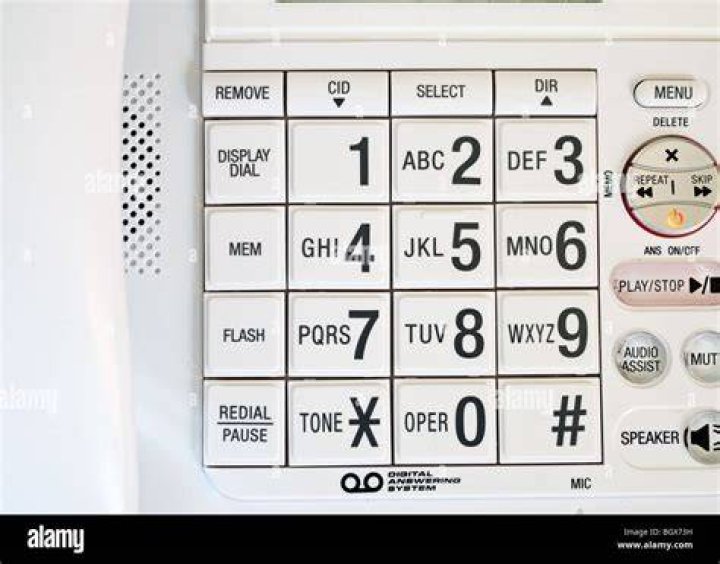
Every day, millions of callers navigating an automated phone menu freeze at the exact same prompt: "Please enter your account number, followed by the pound key." Modern touchscreen displays do not show an abbreviation like "LB," nor do they show a currency symbol. The bottom right corner of the dial pad presents a stark geometric grid of intersecting lines: #.
For international callers and younger mobile users, this terminology triggers instant friction. While North American telecom networks use the phrase instinctively, international callers tracking sterling fluctuations, such as the market volatility outlined in a recent FOREX.com Report, naturally associate the word with the British pound sign (£). Hitting the wrong button or hesitating during an interactive voice response sequence drops the session, erases a typed conference call PIN, or locks callers out of an urgent voicemail password prompt.
📌 Quick Summary:
- The Target Button: The pound key on your phone is the hash symbol (#), anchored in the bottom right corner of every standard smartphone dial pad.
- The Regional Divide: North American telecom calls the glyph a "pound sign" or "number sign," while the rest of the world knows it as the "hash mark" or "hex."
- Operational Purpose: In automated telephony, pressing # acts as an instant "Enter" command, submitting numerical entries to cut dead air and bypass call routing delays.
Finding the Pound Key on Modern iPhone and Android Interfaces
On any standard touch-tone phone keypad, the layout follows an internationally standardized matrix defined by the International Telecommunication Union in 1968. Twelve primary buttons form a symmetrical grid: numbers 1 through 9 run in three sequential rows, followed by a bottom row containing the star key asterisk (*) on the left, the zero (0) in the middle, and the pound key (#) on the right.
Locating the button during an ongoing conversation often introduces an unexpected physical hurdle. If you take your smartphone away from your face to look for the dial pad symbol, the screen may remain completely black. Proximity sensors placed near the top speaker disable the display to prevent your cheek from accidentally triggering buttons. Moving the device slightly forward wakes the screen. If the display shows the call options panel instead of numbers, tap the circular icon labeled Keypad on iOS or Dialpad on Android to bring up the numerical grid immediately.
Once visible, the key you need is unmistakably parked in the lower-right corner. It sits directly beneath the 9 key and directly to the right of the 0 key. Tapping this single icon sends the necessary confirmation frequency down the line, telling the system that your input is complete.
How Bell Labs Turned a Weight Measurement into a Telephony Button
The linguistic confusion surrounding the pound key stems from centuries of handwriting shorthand. Roman merchants calculated weight in libra pondo, meaning "a pound by weight." English writers later abbreviated this Latin term to "lb." Scribes routinely drew a horizontal bar across the top of both letters to show that the characters belonged together as a unified symbol.
As 19th-century typesetters rushed to transcribe fast-moving commercial receipts, they blurred the cross-stroked "lb" into four intersecting lines: two vertical strokes crossed by two parallel slants. The symbol was dubbed the "pound sign" in the United States because it represented weight in pounds on shipping manifests, alongside serving as a shorthand "number sign" when placed before digits.
When AT&T engineers at Bell Laboratories designed dual-tone multi-frequency push-button dialing in the early 1960s, they realized computerized routing would require signaling instructions beyond raw digits 0 through 9. They added two auxiliary buttons to bracket the zero. To keep factory lines moving, engineers gave the right-hand button the whimsical in-house code name octothorpe, referencing its eight outer points, while North American consumer literature simply described it by its everyday domestic identity: the pound sign.
Telephony Keypad Specifications and International Names
Modern telecommunication networks recognize keystrokes through dual-tone multi-frequency signaling. When you touch a dial pad key, your phone generates an acoustic pair of simultaneous sine waves: one low frequency representing its row, and one high frequency representing its column. Automated telecom equipment listens for these distinct audio pairs to register inputs without human intervention.
| Physical Glyph | North American Label | UK & Global Terminology | DTMF Frequencies | Standard Telephony Role |
|---|---|---|---|---|
| # | Pound Key / Number Sign | Hash Symbol / Hex | 941 Hz + 1477 Hz | Enter / Complete Entry / Submit PIN |
| * | Star Key | Asterisk | 941 Hz + 1209 Hz | Cancel / Return to Main Menu / Repeat |
| 0 | Zero / Operator Key | Zero / Nought | 941 Hz + 1336 Hz | Direct Agent Escalation / Default Exit |
Because software scripts inside interactive voice response systems expect this specific audio signature, typing # bypasses the built-in pause timer. An IVR system waiting for a six-digit verification code will typically wait four to six seconds after the final digit to make sure you have finished typing. Hitting the pound key immediately transmits the 941 Hz + 1477 Hz tone pair, cutting the artificial delay and triggering the next routing step instantly.
Automating Passcodes and Conference Lines on iOS and Android
Dialing into recurring bridge numbers or retrieval systems manually introduces human error. Typing an eight-digit access code followed by the pound key while driving or switching apps often leads to mistyped digits and dropped lines. Both major mobile operating systems incorporate hidden syntax tools that allow you to automate the entire string within a contact card or dialer bookmark.
To program an automated sequence on an iPhone dialer keypad, open your contact entry and tap the numerical dial pad. Type the primary corporate phone number, then hold down the asterisk (*) button until it transforms into a single comma (,). In telecommunication protocols, a single comma represents a hard two-second pause. Insert your bridge access code directly after the comma, and place the # symbol at the very end.
For systems that require waiting until a spoken prompt completes before processing data, hold down the pound key (#) in your phone's contact editor until it inserts a semicolon (;). A semicolon instructs your device to hold the dialed sequence until you tap a distinct on-screen "Dial" prompt. By storing a contact string as 1-800-555-0199,123456#, your smartphone dials the host, pauses two seconds for line pickup, punches your conference call PIN, and hits the pound key automatically.
Resolving Common Automated Menu Input Errors
When an automated phone menu fails to acknowledge that you hit the pound key, the root problem rarely lies with the keypad graphic itself. High-efficiency Voice over IP connections often compress audio to save bandwidth. If this compression alters the twin acoustic frequencies of the dual-tone multi-frequency burst, the receiving switchboard drops the command entirely.
If you encounter an interactive voice response platform that ignores your entries, verify that your smartphone's calling settings allow standard DTMF transmission. On older Android builds, this feature is found under Call Settings > DTMF Tones, where switching the option from "Short" to "Long" extends the duration of the audio burst. Giving the tone a longer window ensures degraded cellular connections register the command.
Similarly, callers relying on external speakerphones often introduce echo cancellations that mangle audio tones. Switching from your car's Bluetooth interface or handset speaker directly back to the physical earpiece cleans up background noise, ensuring the interactive voice response software accurately detects your keystrokes.
Frequently Asked Questions (FAQ)
Q1: Is the pound key the exact same button as the hashtag?
A1: Yes. The glyph (#) is identical. Social media platforms popularized the word "hashtag" in 2007 to describe the symbol when paired with metadata tags, but telephone systems have used the exact same physical symbol under the name "pound key" since the 1960s.
Q2: Why do automated systems ask me to press the pound key after my PIN?
A2: Telephone routing systems handle variable-length inputs, such as four-digit voicemail pins or sixteen-digit credit cards. Pressing the pound key signals an immediate end-of-string transmission, functioning like the "Enter" or "Return" key on a computer keyboard so the system processes your request without waiting for a timeout.
Q3: How do I access the pound key on my iPhone if the dial pad disappears during a call?
A3: Pull the phone away from your face to allow the display to light up. If your active screen shows options like "Mute," "Speaker," and "FaceTime," tap the circular icon marked "Keypad" to display the twelve standard dialing keys.
Q4: Why does my phone not show the actual word "pound" anywhere on the screen?
A4: Phone keypads follow an international hardware standard designed to remain language-neutral across global markets. Instead of printing localized terms like "pound" in the US or "hash" in the UK, manufacturers use the universal typographic symbol (#).
Mastering the Modern Phone Keypad
The friction surrounding automated phone menus persists because terminology moves far slower than interface design. Modern operating systems present minimalist, elegant touchscreens, yet the institutional infrastructure powering banks, medical offices, and corporate conferencing still relies on five-decade-old telephone jargon. When an automated voice instructs you to press the pound key, ignore the currency connotations entirely. Tap the # icon at the bottom right corner of your dial pad, submit your entry without waiting for line timeouts, and navigate your calls without hesitation.

